
Shining 3D AutoScan-DS-EX Pro(H) Guide
A lab scanner is judged on one thing above all: how faithfully it turns a physical model or impression into data a CAD package can trust. Margins that read a few microns off become crowns that do not seat, and frameworks that need a remake. The Shining 3D AutoScan-DS-EX Pro(H) is built around that single demand, accuracy first, and it is worth understanding what that focus buys you and what it does not.
This is a desktop model scanner, not an intraoral wand. It lives on a lab bench and digitizes stone models, dies, and impressions. Here is what the hardware actually does, why each spec matters for restorative work, and where the Pro(H) fits next to its faster sibling.
Specifications at a glance
| Specification | Shining 3D |
|---|---|
| Scanner type | Desktop model/impression scanner (lab) |
| Accuracy | ≤8 µm |
| Cameras | Dual 5.0 MP |
| Light source | Blue light |
| Bite registration | 7 seconds |
| Upper/lower jaw | 14 seconds |
| 1–4 dies | 18 seconds |
| 5–8 dies | 30 seconds |
| Full impression | 66 seconds |
| Dimensions | 420 × 260 × 270 mm |
| Weight | 5.0 kg |
| Connection | USB 3.0 |
| Scan modes | Multi Path, High Quality, AI Scan, Texture, HDR |
| Export formats | STL, PLY, OBJ (open) |
Desktop scanner, not intraoral
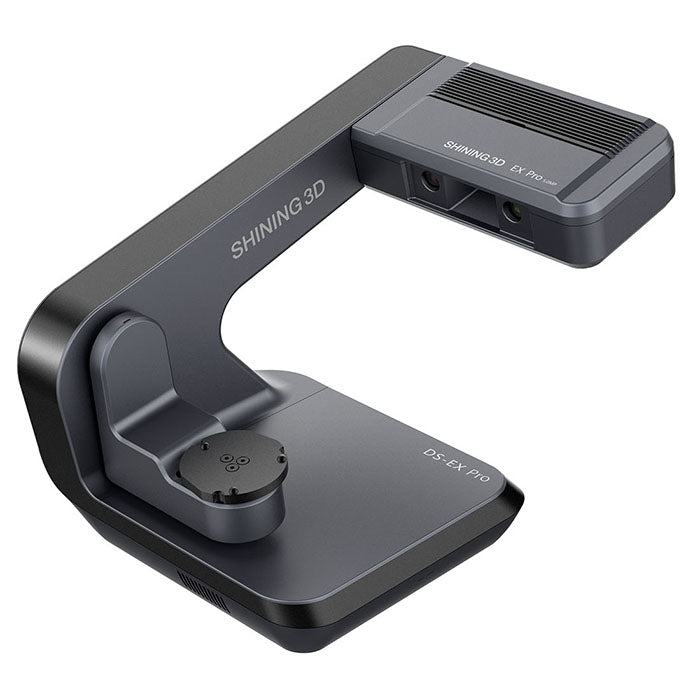
The first thing to settle is category, because it determines every other decision. The Pro(H) is a desktop lab scanner. It captures models, dies, and impressions placed inside the unit, not teeth in a patient's mouth. That is a different job from an intraoral scanner such as the Aoralscan, and the two are not interchangeable.
A desktop scanner can hold its subject perfectly still, light it in a controlled chamber, and use two fixed cameras with known geometry. That is why a bench unit like this can reach accuracy an intraoral wand cannot match, and why labs that take impressions or models from referring offices still want one even in a digital workflow.
Why ≤8 µm accuracy is the headline number
The Pro(H) scans to ≤8 µm accuracy. For context, that is well inside the tolerance most restorative work needs, and it is the reason the (H) exists as a distinct model. The number matters most at the margin line and at implant interfaces, where a small error compounds into a restoration that rocks, opens, or will not seat.
Implant abutments, multi-unit frameworks, and long-span bridges are the cases that punish a loose scan. For single posterior crowns the difference is smaller, but for those tight-tolerance jobs the accuracy tier is exactly what you are paying for. If your lab rarely touches implant bars or full-arch frameworks, the precision is still useful but less decisive.
Dual cameras and blue light
The unit uses two 5.0 MP cameras and a blue-light source. The two work together. Higher-resolution sensors capture finer texture on plaster, die stone, and impression material, which reduces the noise and artifacts that force a rescan. Blue structured light, rather than a laser, handles complex geometry such as undercuts and deep margins more cleanly.
The practical payoff is fewer fights with difficult dies. A deep subgingival margin or a sharp internal line angle is where cheaper scanners produce holes or guesswork; the dual-camera blue-light setup is meant to read those areas on the first pass.
Scan speed, read honestly
The published times are concrete: 7 seconds for a bite, 14 seconds for an upper or lower jaw, 18 seconds for one to four dies, 30 seconds for five to eight, and 66 seconds for a full impression. These are individual scan steps, not a full case start to finish, so plan throughput around the sum of the steps a case actually needs.
For a high-accuracy desktop scanner these are quick. For a lab scanner, speed is about throughput, not patient comfort the way it matters intraorally: how many cases a technician can move through a shift before the scanner becomes the bottleneck.
Open files and where it fits the workflow
The Pro(H) exports open STL, PLY, and OBJ, so the data drops into standard CAD packages rather than locking you into one vendor's design software. That is the expected behavior for a lab scanner and worth confirming against the specific CAD you run.
Where it fits: a lab or larger practice that still receives physical models or impressions and wants a precise, dependable way to bring them into a digital design pipeline. It is the entry point of the workflow, the step that decides how good every downstream design and milled or printed result can be.
Pro(H) versus the speed-focused option
Shining 3D positions the Pro(H) as the precision model in the line, tuned for ≤8 µm work such as implants. The trade in the family is the familiar one between maximum accuracy and color or speed. If your caseload is dominated by tight-tolerance implant and framework work, the accuracy-first (H) is the deliberate choice. If color texture and throughput matter more than the last few microns, the lighter-accuracy variant may suit better.
Confirm the exact configuration with Dentcore before ordering, since the model suffix determines accuracy tier and feature set.
See the AutoScan-DS-EX Pro(H) at Dentcore
Dentcore carries the AutoScan-DS-EX Pro(H) desktop lab scanner. Review the specs, confirm the right configuration for your caseload, and check current availability.
View AutoScan-DS-EX Pro(H)Browse all Shining 3D scanners and printers →