
Restorative base
Single crowns, bridges, veneers, inlays, onlays, provisionals, removables, and appliances start in DentalCAD.

DentalCAD, exoplan, modules, Flex or Perpetual licensing, and AI services all depend on what your team actually designs. Dentcore helps labs and practices scope the software clearly, then purchase through active Dentcore product pages.
Most mistakes come from buying a license before mapping real case volume. Dentcore scopes the production path first, then points you to the right bundle or module.
Single crowns, bridges, veneers, inlays, onlays, provisionals, removables, and appliances start in DentalCAD.
Add Implant, Model Creator, Bar, Bite Splint, Smile Creator, or Full Denture only when the case mix requires it.
Confirm DentalCAD version, market availability, license model, and exocad Credit needs before promising AI workflows.
Dentcore helps align license, hardware, production team, renewal path, and support before checkout.
Current exocad AI services are tied to DentalCAD version, license model, upgrade contract status, my.exocad integration, selected-market availability, and credits. Dentcore confirms those details before purchase.
AI Design can generate single and multi-unit crown design proposals and adapts to patient anatomy, adjacent teeth, occlusion, and configured DentalCAD preferences.
For smile presentation, TruSmile Photo and TruSmile Video create AI-powered previews based on Smile Creator workflows where available.
DentalCAD 3.3 extends AI Design to selected multi-unit crown and bridge workflows, subject to availability.
Chemnitz adds AI-based automation intended to speed up bite splint design.
exocad describes 30 monthly credits for Flex licenses and 10 for Perpetual licenses with active upgrade contract in supported regions.
AI services are available only where exocad supports them. Dentcore confirms eligibility, active upgrade contract status, my.exocad setup, and credit needs before purchase.
DentalCAD is broad; that is exactly why a clean buying path matters. A crown-and-bridge team, an implant-heavy lab, and a full-arch practice should not be sold the same stack without review.

Crowns, bridges, veneers, inlays, onlays, provisionals, removables, and appliances.
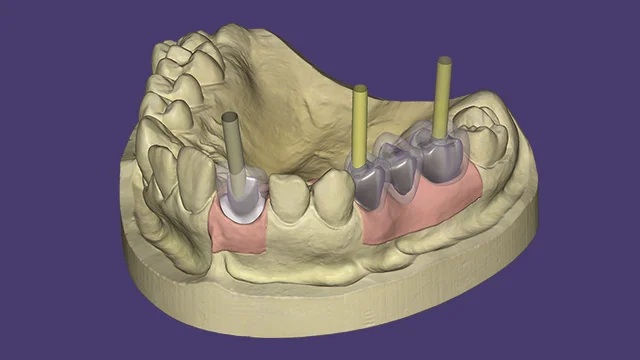
Abutment and implant workflows when case planning extends beyond basic restorative design.
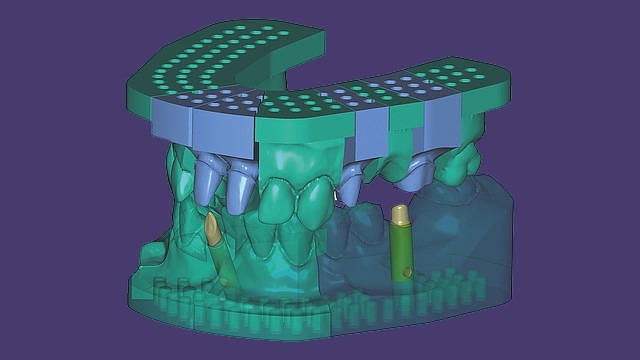
Model workflows for printed and production verification steps.
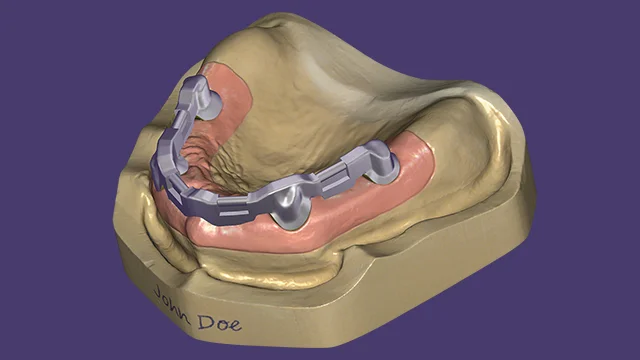
Bar and suprastructure workflows for complex removable or hybrid production.
Build around scanner, printer, mill, material, and library compatibility instead of a closed path.
New workflow efficiency, AI service improvements, implant upgrades, and model/splint updates.
These are standard Dentcore public products. Use the product cards below to compare the live catalog before choosing a license path.

A practical starting point for restorative CAD/CAM teams.

For teams that need implant-driven design and model workflows.

The broadest Dentcore exocad bundle for complex case types.

Implant planning and guide workflows connected to the restorative plan.

Credits for AI Design, TruSmile Photo, and TruSmile Video where available.
Dentcore helps compare Flex and Perpetual paths, active upgrade contracts, AI credit needs, and which module set is appropriate for the lab or practice.

Send Dentcore your case mix, current scanner/CAM stack, and whether you want Flex, Perpetual, or AI services. We will point you to the right public product or prepare a clean quote.